




Tip #1: Upload your own COIs for faster processing
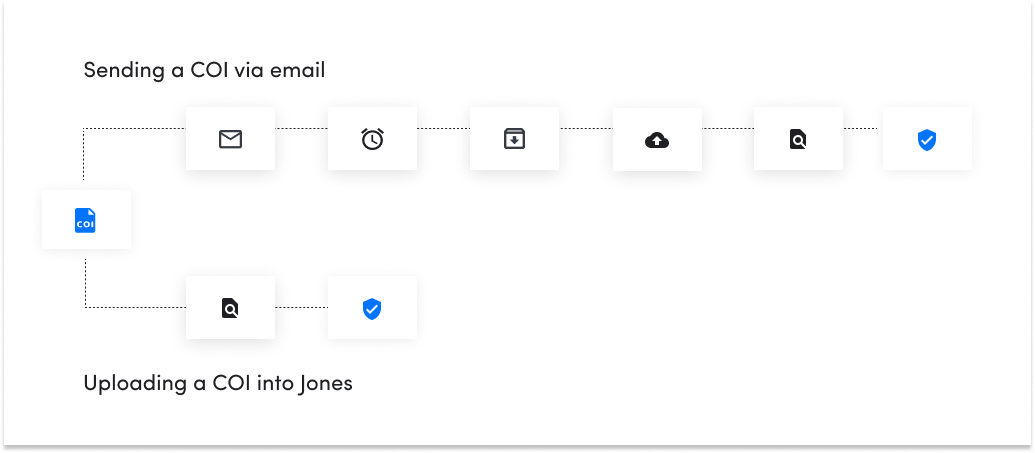
Customers who are comfortable uploading vendors’ COIs directly in Jones instead of emailing them get vendors compliant and ready to start on the project up to 5 hours faster than average.
The reason is simple. When you email a COI to our team, it takes time for the email to be addressed and for the COI to be downloaded and moved into the Jones account. If you’ve attached several COIs to the same email, the time to read each COI and identify the correct vendor record also keeps adding up to the count. Only then does the COI gets reviewed.
In comparison, if you upload the COI yourself, you will effectively bypass half of the process, “skip” the line and get the overall COI review time significantly reduced.
Time investment: seconds!
To learn how to add COIs on Jones, click here.
Tip #2: Add new vendors for faster approval
Similarly to uploading your vendors’ COIs, you can “skip” the line and get vendors into the building faster by adding them to your Jones account rather than emailing the Jones team. Our average response rate to customer emails is 24 hours (which is not bad at all if we say so ourselves).
However, if you need to approve a vendor FAST, adding them yourself will definitely help you expedite the process.
Time investment required: seconds!
To learn how to add COIs on Jones, click here.
Tip #3: Clean your account dashboard by archiving/deleting records
There are two reasons why we at Jones recommend that you occasionally archive or delete vendors or tenants from your account:
- Housekeeping 🎯
It helps you to de-clutter your dashboard, get better visibility, maintain accurate reporting, and have better relationships with your vendors.
- Communication ✉️
It helps you reduce unnecessary communication with vendors and tenants. Not going to have the building re-painted for at least two more years? No need to ask the painter to update the expired COI in 6 months!
Time investment: 5-7 minutes a week