




Why “Semi-Integrated” Isn’t Enough
Compliance shouldn’t slow you down in Procore. But for too many construction teams, tracking insurance documents is still disconnected from the core systems of record — something that creates friction between the back office and the field. If your compliance tools aren’t fully integrated into your project management workflow, they’re not really helping you move faster.
Most compliance platforms on the market today follow a predictable pattern:
- They send templated COI requests on your behalf
- Subcontractors upload PDFs to a portal they’ve never seen before
- A back-office team audits the docs
- And you get notified — eventually — if something’s wrong
But here’s the issue: project teams are left out of the loop. You can’t take action when it matters, because the tools aren’t built into the tools project managers already use. And that means:
- No visibility at the moment of contract creation
- No control over COI request timing
- No way to move quickly when subs are holding up progress
Now Live: Request COIs Directly from the Jones Side Panel in Commitments
With the Jones Side Panel in Procore you can instantly see the sub’s current insurance compliance status directly on a commitment.
And if they haven’t uploaded a COI to Jones yet?
You can now trigger the request right from the subcontract you’re working on.
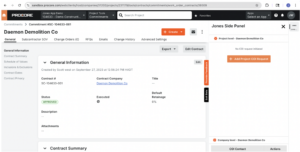
This isn’t your legacy system. It’s compliance action in real time. You get visibility at the moment of contract creation and control over COI request timing.
How This Stacks Up
| Feature | Other Platforms | Jones |
| COI requests from commitment screen | ❌ Not available | ✅ From the Side Panel |
| Compliance status in Procore | ❌ Limited visibility | ✅ Instantly visible inside the commitment (or in the full app) |
| Project team empowerment | ❌ Centralized admin-only | ✅ Anyone with access to the commitment can act |
| No login/portal needed for subs | ❌ Requires vendor onboarding | ✅ Request via email, no new passwords |
| Speed to resolution | 🐢 Wait for audit queue | ⚡ Quick request + fast turnaround |
Who Wins
- Project managers working directly in commitments
- Risk teams who want visibility without bottlenecks
- Subcontractors who get clear, actionable requests
- Executives who care about closing insurance gaps — fast
The Takeaway
Jones is different because we build tools where construction teams already work — not just where compliance teams want to report.
While legacy systems still rely on generic workflows, we’re betting on a simpler approach:
Put compliance tools into the hands of the people who need it, at the exact moment they’re making decisions.
Already a customer of Jones and Procore? Reach out to your customer success manager to help you set up the Jones Side Panel.
Frequently Asked Questions (FAQs):
Q: Do I need to install anything new?
A: If you are already a Jones customer and have the Side Panel installed, no action is required. If you are a new customer and don’t yet have either our Procore App or Side Panel installed, you need to install both. This is part of the implementation process for new customers and your implementation manager will show you how to do that.
Q: Will subcontractors need a Jones login?
A: Subcontractors do not need a Jones login. When they are sent a COI request they can submit via a secure link sent to their email.
Q: Can I use this if I don’t manage Commitments in Procore?
A: This feature is meant to make COI requests easier for users who work primarily in commitments. If you don’t use commitments in Procore, you can use our Procore App to initiate COI requests.
Related: How Jones Supercharges ERP Integrations with AI Agents For Insurance Compliance